
Help & Guides · 3-Bucket Models · Core & Lifestyle
How the Core & Lifestyle Calculators Work
The bucket rules behind all four Core & Lifestyle calculators, what each calculator solves for, and how the Monte Carlo analysis tests a plan.
1
How the Buckets Work
The Safety Bucket is presumed to hold lower-return, low-risk debt, while the Income Bucket holds relatively higher-return investments.
The Safety Bucket keeps enough for future essential expenses, while the Income Bucket keeps enough for future discretionary expenses. Each year, the Safety Bucket pays the essential expenses, while the Income Bucket pays the discretionary expenses. The Growth Bucket replenishes both Buckets every year.
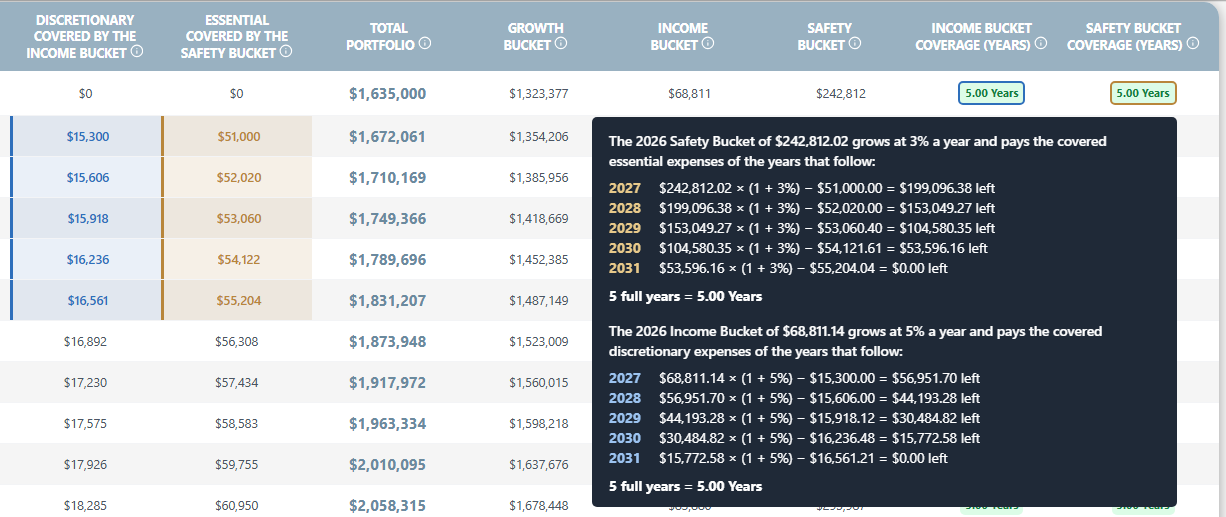
The Safety Bucket, worth $242,812, covers the next 5 years of essential expenses. The Income Bucket, worth $68,811, covers the next 5 years of discretionary expenses.
2
Safety Bucket Glidepath
The calculator allows you to introduce a glidepath that changes the Safety Bucket's target level over time.
You can specify:
•
Whether the target number of years of essential expenses increases or decreases over time.
•
The minimum and maximum number of years of essential expenses the Safety Bucket can hold.
•
When the target changes and how frequently it changes.
This allows you to model a Safety Bucket that evolves throughout retirement rather than maintaining a constant target.
3
Income Bucket Glidepath
The calculator allows you to introduce a glidepath that changes the Income Bucket's target level over time.
You can specify:
•
Whether the target number of years of discretionary expenses increases or decreases over time.
•
The minimum and maximum number of years of discretionary expenses the Income Bucket can hold.
•
When the target changes and how frequently it changes.
This allows you to model a Income Bucket that evolves throughout retirement rather than maintaining a constant target.
4
Expense Coverage
You can choose the percentage of essential expenses used to calculate the Safety Bucket's target, and the percentage of discretionary expenses used to calculate the Income Bucket's target. The permitted range for each is 100%–200%.
These percentages determine the target sizes, not the expenses the Buckets actually pay. The Safety Bucket continues to pay the full actual essential expenses each year, and the Income Bucket the full actual discretionary expenses.
For example, choosing 150% coverage allows a Bucket to hold more than the amount required for its preset years of expenses. This provides an additional reserve against unexpected spending shocks.
5
Uploading Your Own Expenses
Instead of using the calculator's standard expense inputs, you can upload your own yearly expenses.
This is useful when expenses do not follow the standard growth assumptions or when you need to include irregular expenses and inflows. Inflows can be entered as negative expenses.
6
Planning Beyond the Last Year of Retirement
The calculator offers two options for determining how the Safety Bucket's and Income Bucket's targets are handled toward the end of the plan.
Option 1 · Safety Bucket
Expenses end with retirement
The Safety Bucket only needs to cover essential expenses through the final year of the plan. As fewer years of essential expenses remain, its target can decline, allowing the Safety Bucket to wind down toward the end of retirement.
Option 1 · Income Bucket
Expenses end with retirement
The Income Bucket only needs to cover discretionary expenses through the final year of the plan. As fewer years of discretionary expenses remain, its target can decline, allowing the Income Bucket to wind down toward the end of retirement.
Option 2 · Safety Bucket
Maintain the target beyond retirement
The Safety Bucket continues to target the preset number of years of essential expenses, even in the final years of the plan. This means it may retain funds to cover essential expenses beyond the chosen planning horizon.
Option 2 · Income Bucket
Maintain the target beyond retirement
The Income Bucket continues to target the preset number of years of discretionary expenses, even in the final years of the plan. This means it may retain funds to cover discretionary expenses beyond the chosen planning horizon.
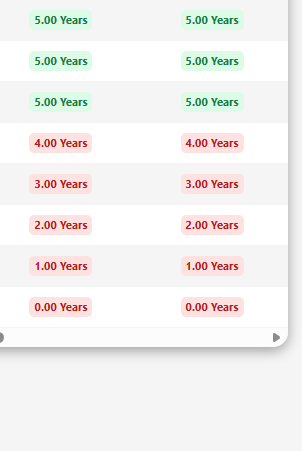
Option 1: in the final years, the Income Bucket (left) and Safety Bucket (right) wind down to 0 years.
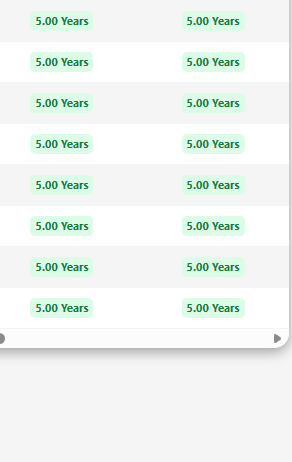
Option 2: the Income Bucket (left) and Safety Bucket (right) stay at 5 years to the last year.
The second option is useful for retirees who want to keep both Buckets at their targets even in the final year of the plan, particularly because the actual end of retirement is uncertain.
7
When the Initial Portfolio Is Insufficient
In some cases, the Growth Bucket may not have enough money to replenish the Safety Bucket and Income Bucket as required throughout retirement while also meeting the chosen legacy target.
When this happens, the calculator determines a higher initial portfolio value that would meet the model's requirements and achieve the chosen legacy level.
The four Core & Lifestyle calculators
All four follow the Bucket rules above. Each one solves for a different question.
Final Legacy
The largest legacy you can leave, given your starting corpus and expenses.
Retirement Corpus Required
The smallest starting corpus that covers your expenses and reaches your legacy goal.
Maximum Discretionary Spending
The most you can spend on discretionary expenses while still meeting your goals.
Maximum Safety Levels Allowed Under Bucket Approach
The most years of essential expenses the Safety Bucket can hold while still meeting your goals.
Monte Carlo Analysis
The Monte Carlo feature runs multiple simulations using varying investment returns to evaluate how often a retirement plan meets its goals.
1
Defining Success
You can specify the minimum legacy required for a simulation to be considered successful. A simulation counts as a success if the portfolio never runs out during the plan and ends with at least this legacy.
2
Growth Bucket Returns
You can specify an average annual return and a standard deviation for the Growth Bucket's returns.
The average return sets the expected return assumption, while the standard deviation determines the volatility of returns across simulated years.
3
Safety Bucket and Income Bucket Returns
You can choose to randomize the Safety Bucket's and Income Bucket's annual returns, each on its own, allowing their returns to vary from year to year rather than remain fixed.
4
Skipping Safety Bucket and Income Bucket Refills
You can set a threshold for refills from the Growth Bucket based on its compounded return over the previous three years. If that 3-year return falls below the chosen threshold, the Growth Bucket does not refill the Safety Bucket and Income Bucket that year. Such a year is called a skip year.
Example: if the threshold is −5%, the refill is skipped when the Growth Bucket's compounded return over the previous three years is below −5%.
If fewer than three years have passed since the start of the plan, the refill decision is based on the available Growth Bucket returns since the plan began.
The Core & Lifestyle model allows for dynamic spending. If the Safety Bucket ever runs out, in a skip year or otherwise, the Income Bucket then pays the essential expenses first, and only the portion of discretionary expenses specified under an optional feature on the Monte Carlo input sheet.
Example: if the percentage of discretionary expenses to be paid by the Income Bucket when the Safety Bucket runs out is set at 50%, the Income Bucket first covers 100% of the essential expenses and, with the money left, pays only 50% of the discretionary expenses that come due that year.
If the optional feature is kept toggled off, the Income Bucket pays 100% of the discretionary expenses after first paying the essential expenses.
If the Income Bucket also runs out, the Growth Bucket pays only the essential expenses and no discretionary expenses that year.
5
Planning Beyond the Last Year of Retirement
Monte Carlo analysis always maintains the Safety Bucket and Income Bucket at their target levels through the end of the plan, corresponding to Option 2 above. This applies regardless of which option was selected on the main calculator.
6
Number of Simulations
You can choose how many simulations to run, up to a maximum of 10,000. Running more simulations provides a broader sample of possible outcomes, although it does not guarantee that the results will predict actual future performance.
Ready to try it?
Pick one of the four Core & Lifestyle calculators and run your own numbers.
Go to Calculators

Product
Calculators
Pricing
Contact Us
Resources
FAQs
Blogs
Help & Guides
• 2-Bucket Model
• 3-Bucket Models
◦ Constant Refilling Model
◦ Stacked Model
◦ Core & Lifestyle Model
Follow Us
© 2026 Cherish Retirement LLC. All rights reserved.
Privacy Policy
•
Terms of Service
Disclaimer:
The content and tools on this website are provided for informational and educational purposes only and do not constitute financial, investment, tax, or legal advice.
All calculations, projections, and outputs are provided for illustrative purposes only. We make no representations or warranties as to their accuracy and assume no responsibility for errors, omissions, or outcomes resulting from their use.
These tools are not a comprehensive financial plan and should not be relied upon as the sole basis for making financial decisions. Actual results may vary due to market conditions, inflation, taxes, spending behavior, and other factors.
Users are encouraged to consult a qualified financial professional, preferably acting in a fiduciary capacity, before making any significant financial or retirement-related decisions. All content and tools are provided “as is,” without warranties of any kind.